



Local rank tracking: how to measure "near me" visibility properly
A local rank is a pair, not a number. Fix the keyword, location and measurement point, then report average, outliers and movement without overclaiming.
Last updated:
A ranking report that says "position 4" for a local business is almost meaningless on its own. Position 4 from where? On which device, for which searcher, at what distance from the door? Local results are assembled per query and per location, and a single national number hides the only thing a multi-site team needs: which store is invisible, and where.
Local rank tracking is the discipline that makes the number honest. It fixes the keyword, the location and the measurement point, records the result over time, and reports it next to the work that was done. This guide covers what to track, how to measure it, and how to present it without overclaiming.
What is local rank tracking?
The unit is the pair: location plus keyword. "Dentist near me" is not one result; it is a different result for each practice, each neighbourhood and each phone. Tracking starts by accepting that and choosing the pairs that matter.
Why "near me" is not one number
Five things change the result before your profile does:
- Proximity. Distance between the searcher and the business is a documented ranking factor. A store can rank first in its street and fourth two kilometres away.
- Device. Mobile and desktop layouts differ, and mobile often puts the map first. A position measured on a desktop is not the position a customer on the pavement sees.
- Personalisation. Search history, previous visits and account settings can reorder results. A clean, logged-out measurement is a different observation from a customer's.
- Competition at the point. A competitor opening between your store and the searcher changes the local pack without any change on your side.
- Layout. Google tests and changes how local results appear. A shift from three results to a map-first panel can move "position" without moving the business.
This is why a single rank is a story and a grid is a measurement. A grid samples several points around a store and shows where the business is strong and where it disappears. You do not need a hundred points for a monthly report; five to nine around each site is enough to see a pattern.
What to track: three keyword groups
| Group | Purpose | Examples |
|---|---|---|
| Brand | The baseline you should never lose | "Northside Dental", "Northside Dental Camden" |
| Category | Where competition actually happens | "dentist", "emergency dentist", "tyre fitting" |
| Neighbourhood | How nearby customers search | "dentist near Camden station", "supermarket Islington" |
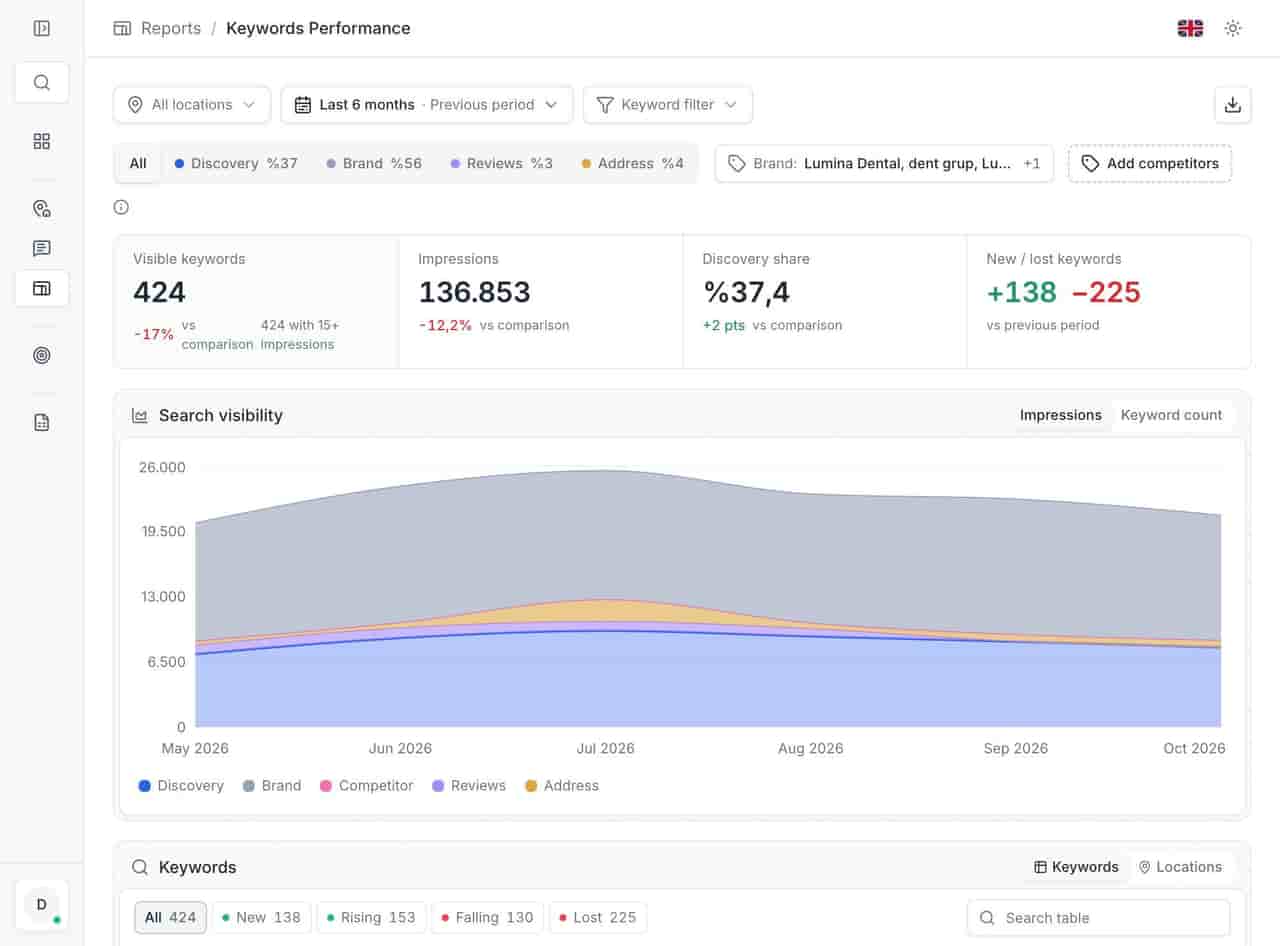
A set of 20 to 40 terms per location is usually enough. Longer lists make the average meaningless and the report unreadable. In the anonymized 23-location demo account behind this site, the keyword view holds 424 visible terms and 136,853 impressions across six months. That is a sample of the data behind the set, not a recommended keyword count.
Two rules keep the set useful:
- Every term must be one a customer would type. Not a category you wish they typed.
- The same set applies to every location, so the comparison holds. Location-specific additions are marked separately.
Three ways to measure, and what each is worth
| Method | What it gives you | Limits |
|---|---|---|
| Manual check | A free observation from your own device | Personalised, not repeatable, impossible across 20 stores |
| Scraping or rank API | Positions from many grid points, automated | Cost per keyword, terms-of-service risk, no link to profile data |
| Profile-connected panel | Per-location position plus impressions, calls and directions | Depends on the keyword set you define; not a Google-official rank feed |
Google's own Business Profile APIs return performance data — impressions, calls, directions, website clicks — not a keyword position. Any position number comes from measuring search results from a point, which is why the method has to be stated in the report. A number without a method is not comparable to last month's number.
The practical choice for most multi-site teams is a small, stable keyword set measured consistently, paired with the impressions data from the profile. Position explains competitiveness; impressions explain demand. Neither replaces the other.
Read the outlier, not the average
An average position of 6 can be five stores at 3 and one at 21. The average looks healthy; one market is invisible. Always open the per-location view before writing the summary.
Three readings matter:
- Median and worst. The median tells you the typical store; the worst tells you where the problem is.
- Movement, not level. A store at 8 that moved from 14 is improving. A store at 3 that fell from 1 is a risk.
- Direction over weeks. Local positions fluctuate. One day's number is noise; four weeks is a trend.
Pair the position with the interaction rate. A store ranking well but converting poorly has a profile problem — hours, photos, reviews. A store converting well but ranking poorly has a visibility problem. The two need different fixes.
A monthly report that survives scrutiny
- State the date range and the measurement method. One line each. Without them the rest is anecdote.
- List the keyword set once, and note any additions since last month.
- Show the average, the median and the worst location. Three numbers, one table.
- Name the outliers. The three stores that moved most, in either direction.
- Record the work done. Hours fixed, photos added, categories corrected, reviews answered. A position change with no work log is a coincidence until proven otherwise.
- Separate demand from position. Impressions and interactions on one side, positions on the other. Keyword performance explains the demand side; impressions and interactions explains what happened next.
- End with next month's three actions. A report that ends with a chart invites an argument; one that ends with actions invites a decision.
What not to do with rank tracking
- Do not promise a position. No tool controls distance, competition or layout. A contract that guarantees "top 3" is selling something nobody owns.
- Do not track a hundred keywords per store. It inflates the invoice and destroys the average.
- Do not compare a mobile grid with a desktop manual check. State the method or the comparison is invalid.
- Do not report a single day. Local results move for reasons unrelated to your work.
- Do not change the keyword set quietly. A new set is a new baseline; say so in the report.
- Do not treat position as revenue. Position is a leading indicator. Calls and direction requests are closer to the money.
Checklist before you publish a rank report
- Keyword set is fixed and documented.
- Every location is measured with the same method and device profile.
- The date range matches the other reports in the pack.
- Average, median and worst location are all shown.
- Outliers are named with a possible cause.
- The work log for the period is attached.
- Impressions and interactions sit beside the positions.
- Next month's actions are written down.
A number you can defend
Local rank tracking is not about finding one true position; there isn't one. It is about fixing the measurement so the direction is trustworthy, then using the outliers to decide where to work. A store that moves from invisible to competitive in one neighbourhood is a result worth reporting — even if the estate average barely moves.
If the report is for a supermarket or retail estate, start with the neighbourhood terms customers actually use, and read the supermarket guide for how maps traffic changes the picture. If you are still separating exposure from position, what impressions mean is the prerequisite.
Local rank tracking keeps the keyword set, the per-location view and the monthly movement in one place, with the same definition across the estate.
Questions, answered.
How many keywords should each location track?
Does Google provide a local ranking API?
Why does the position change without any profile edit?
See how the deleted reviews archive keeps the record, including the reply.
FeaturesKeep reading
Related
Related pages
Features, sectors and reading that share the same work.