



Visibility and reporting
Google Business Profile keyword performance per location
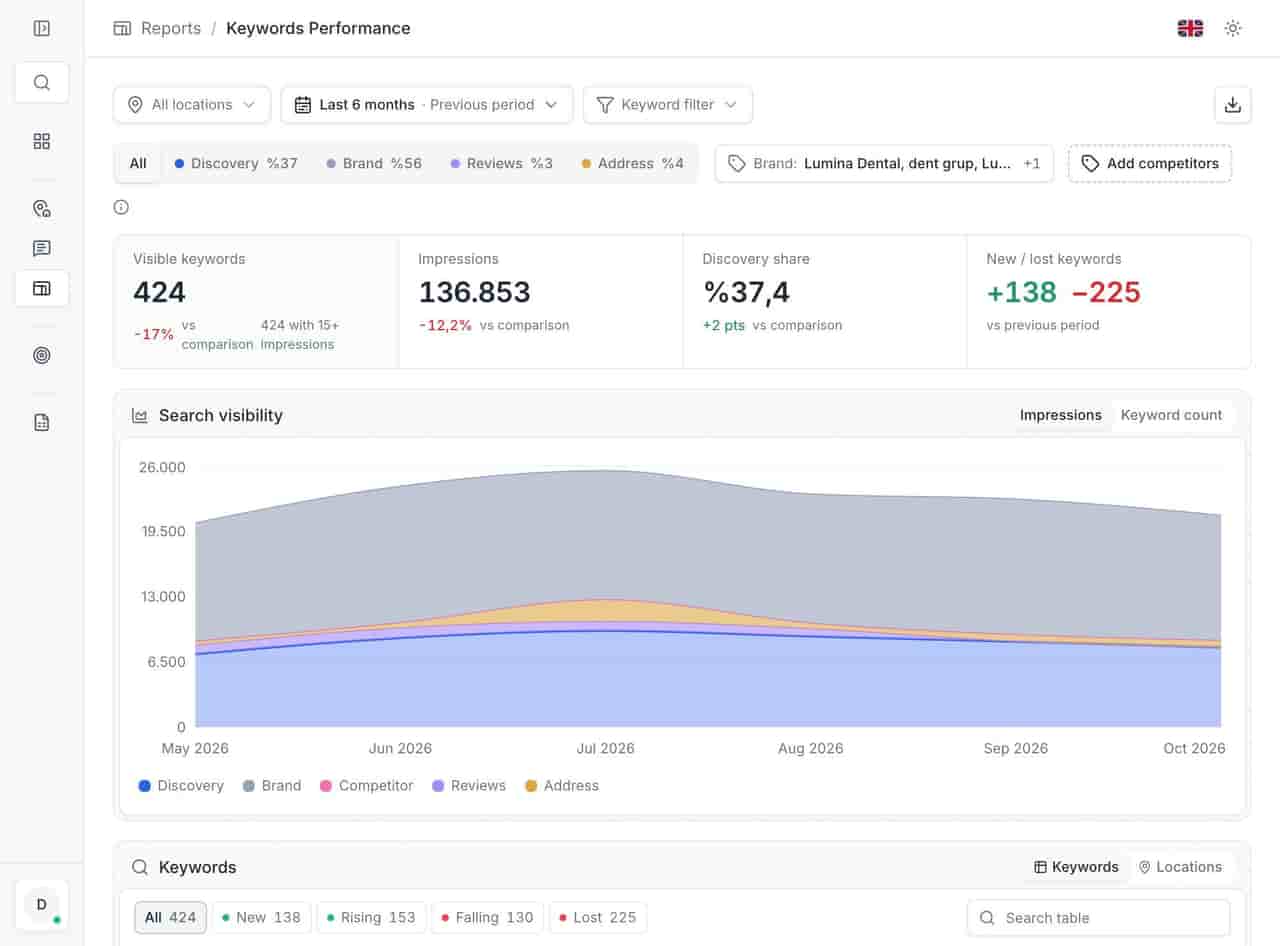
Keyword performance lists the terms your locations appeared for, the impressions each produced, and how much came from people who did not know your name. It is the difference between being found and being chosen.
Last updated:
What is keyword performance in Locationes?
The report of search terms a location appeared for in Google, grouped into discovery, brand, review and address categories. It counts visible keywords, impressions, discovery share and terms gained or lost in a period, then lists each term with impressions, change, trend and the number of locations it appears for.
- Visible keywords over six months
- 424
- Impressions over the same period
- 136,853
- Locations contributing to the set
- 23
From the anonymized 23-location demo account, November 2026. Not a customer result.
What you get
- A summary you can read in ten seconds.
- A table you can search for a term you already suspect.
- Impressions per term, not one blended total.
- Location counts, to separate estate-wide from local.
01See the terms you appear for
See the terms you appear for
The report opens with four numbers — visible keywords, impressions, discovery share, new versus lost terms — then drops into a table. Each row is a term with its impressions, change, trend direction and location count. That last column is how you find a term only one store owns.
- A summary you can read in ten seconds. - A table you can search for a term you already suspect. - Impressions per term, not one blended total. - Location counts, to separate estate-wide from local.
- A summary you can read in ten seconds.
- A table you can search for a term you already suspect.
- Impressions per term, not one blended total.
- Location counts, to separate estate-wide from local. ../assets/screenshots/report-keywords-en.jpg — Alt: "Keyword performance report with visible keywords, impressions and a table of terms with impressions, change, trend and location count."
02Separate discovery from brand
Separate discovery from brand
Impressions from people searching your name are not growth; they are demand you already had. The category split makes that explicit: discovery terms are the opportunity, brand terms the baseline, review and address terms the associations customers already hold.
- Discovery: searches without your brand name. - Brand: your name and its variants. - Review and address: phrases tied to reviews or a district.
- Discovery: searches without your brand name.
- Brand: your name and its variants.
- Review and address: phrases tied to reviews or a district. ../assets/screenshots/report-keywords-en.jpg — Alt: "Category distribution of keywords across discovery, brand, review and address terms."
03Track gains and losses
Track gains and losses
A keyword that appears is interesting; one that disappears is actionable. The report counts new and lost terms, and you can register your own brand names and the competitors you want tracked, so those searches are classified rather than left in discovery.
- New and lost terms counted per period. - Your brand vocabulary registered, not guessed. - Competitor names tracked deliberately. - The same keyword set applied to every location.
- New and lost terms counted per period.
- Your brand vocabulary registered, not guessed.
- Competitor names tracked deliberately.
- The same keyword set applied to every location. ../assets/screenshots/report-keywords-en.jpg — Alt: "Keyword table filtered to the terms with the largest change over the period."
Related
Related pages
Features, sectors and reading that share the same work.
FAQ
Keyword performance questions
Where do the keywords come from?
From the searches your locations appeared for in Google, as reported through Business Profile data. Locationes does not invent a keyword list; it classifies what Google recorded and tracks how it changes.
What is discovery share?
The part of your impressions that came from searches without your brand name — people who did not already know you. It is the closest thing to a growth measure in the report.
Can we add competitor names?
Yes. Register the brand terms and competitor names you want tracked, so searches containing them are classified and reported instead of sitting in the discovery bucket.
Why do the last days look incomplete?
Google finalises performance data with a delay of about five days, so recent impressions can still change. The report shows what it has and does not estimate the missing days.
Start with the queue you already have.
Connect one Google account and open the unanswered tab. Three days is enough to see whether the backlog is smaller on Monday.