



Google Business Profile impressions: what the number means
Impressions measure being seen, not chosen. Learn what counts, how they differ from clicks and calls, and why the last five days keep changing.
Last updated:
Every month someone asks why impressions fell and nobody can answer. The number moved, a report was screenshotted, and the meeting ends with a theory about the algorithm. The useful question is earlier: what exactly is being counted, and what would have to happen for the count to change?
Impressions are the most misread number in local reporting, because they measure being seen rather than being chosen. This guide defines the metric, separates it from the actions that follow, and explains the two patterns that explain most of the movement a team sees — including the one caused by Google's own reporting delay.
What is a Google Business Profile impression?
Impressions are an exposure metric. They answer "how often was there a chance to be chosen", not "how many customers arrived". A location can double its impressions and send the same number of people through the door, which is why the number is only useful next to the interactions it produced.
Where an impression happens
| Surface | What it means | What to check |
|---|---|---|
| Local pack | The three-result block above organic results for a local query | Category, proximity, review strength |
| Google Maps | A pin or listing shown while someone browses the map | Photos, hours, services, distance |
| Business panel | The listing shown for a brand or category search | Description, posts, photos, review replies |
| Mobile search | The same surfaces on a phone, often with a map first | Mobile hours, tap-to-call, short description |
| Desktop search | More comparison behaviour, more tabs | Website link, services, price context |
A brand search and a category search produce very different impressions. A brand impression means someone already knows the name. A category impression means they are choosing. Mixing the two into one total hides the only distinction that matters for growth.
Impressions, clicks and interactions are three different things
The order is a funnel, and each step answers a different question:
- Impression — the listing appeared. Did we have a chance?
- Interaction — someone called, asked for directions or clicked the website. Did they act?
- Outcome — a booking, a visit, a sale. Did the business benefit?
Google reports the middle step as interactions, split into calls, direction requests and website clicks. In the anonymized 23-location demo account behind this site, 57,586 impressions and 13,028 interactions were recorded in 30 days. Those are sample figures, not a benchmark; the point is that the two numbers are reported together, with the same date range and the same locations.
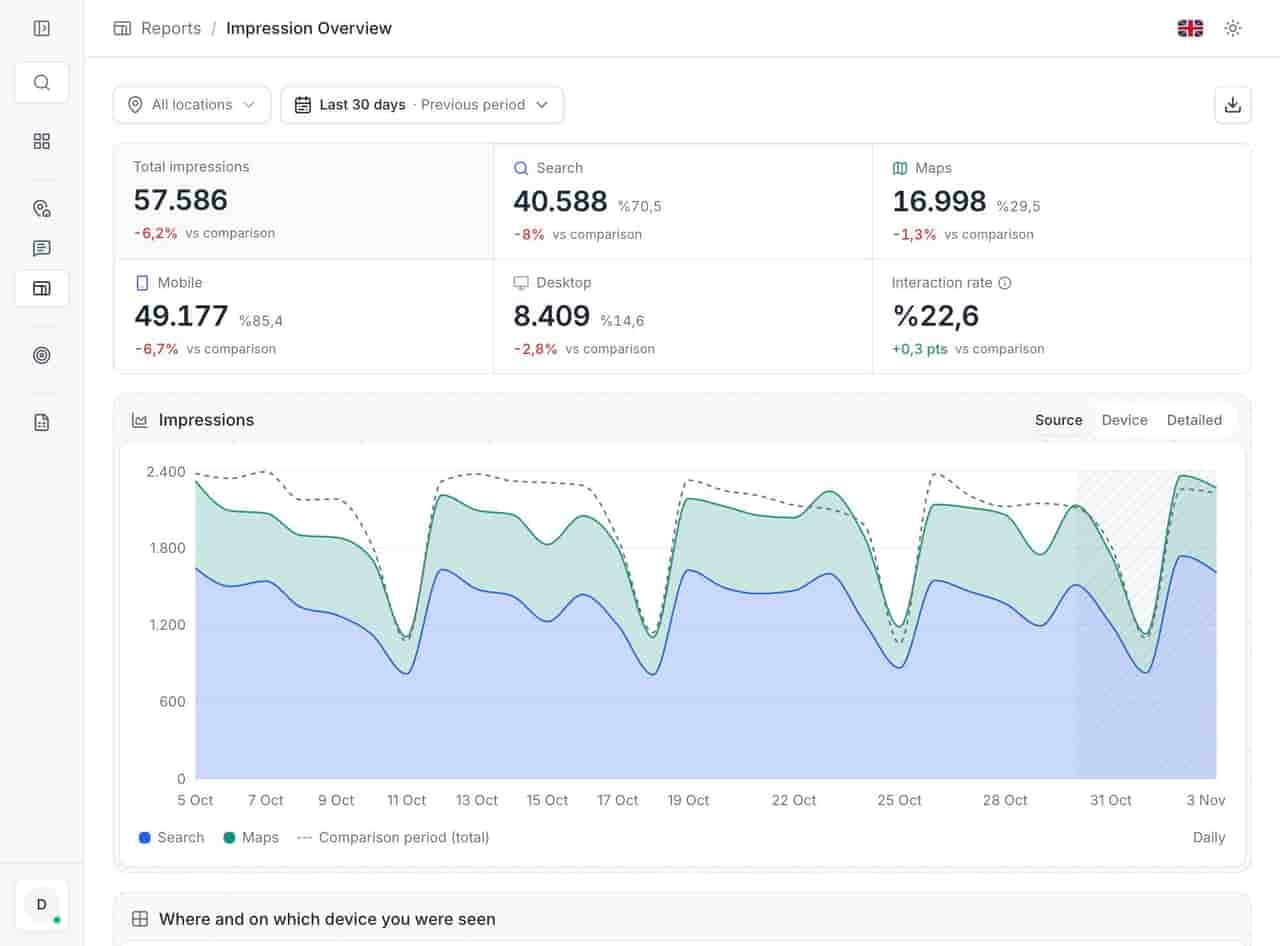
The interaction rate is the useful derived number: interactions divided by impressions. It answers whether the listing convinces the people who see it. A store with fewer impressions and a higher rate is often doing better local work than a large store with a low rate — it is just harder to notice in a volume-sorted table.
Search versus maps, mobile versus desktop
The split is not a technical detail. It changes what you should fix next.
- Maps-heavy usually means people nearby are already looking for a place to go now. Photos, opening hours and directions matter most.
- Search-heavy usually means people are comparing options before they move. Description, services, reviews and the website link carry more weight.
- Mobile-heavy raises the cost of a wrong hour or a missing tap-to-call number. The customer is on the street, not at a desk.
- Desktop-heavy suggests research: longer descriptions, service lists and a website that opens the right location page.
A change in the mix can move the total without any change in performance. If a campaign pushes brand searches on mobile, impressions rise and the interaction rate falls, because more people saw the listing without needing to act.
Why the last five days keep changing
Google finalizes performance data with a delay of about five days. Recent days are incomplete, and the numbers can rise later as the data settles. The product shows what it has and does not estimate the missing days.
This has three practical consequences:
- Do not report a partial month. Export after the data has settled, or mark the last week as provisional.
- Do not panic on a Monday. A weekend dip that looks alarming on Sunday often closes by Thursday.
- Do not compare two periods with different lag. Month-to-date against a full month is not a comparison; it is a shape.
When a fall is normal
Most drops have an ordinary cause. The table is a triage order, not a diagnosis.
| Pattern | Likely cause | First check |
|---|---|---|
| Everything falls at once across locations | A reporting delay, a Google layout change or a date-range error | Re-export the same range a week later |
| One location falls, others steady | Hours changed, listing suspended or a duplicate appeared | Run the alerts check and open the location |
| Gradual fall over months | Ranking loss, new competitors, category drift | Rank tracking and keyword performance |
| Sharp fall after a profile edit | A field change that reduced relevance | Compare the field history and re-audit |
| Rise then fall around a campaign | Brand searches returned to normal | Split brand and discovery terms |
| Fall only on mobile | Hours, call button or page speed | Open the listing on a phone |
The worst response is to "fix" the profile before checking whether the data is complete. A bulk edit made in a panic is harder to unwind than a number that corrects itself in five days.
What not to do when the number moves
- Do not edit the profile to chase a daily number. Local data is noisy; wait for the settle and read the week.
- Do not present a partial month as final. Mark the last five days provisional or exclude them.
- Do not compare a mobile total with a desktop total. Split first, then compare.
- Do not use impressions as proof of demand. Pair them with calls, directions and website clicks.
A monthly impressions routine
- Pick one date range and use it for every report in the pack.
- Export after the five-day settle, and label the final days as provisional.
- Split by surface and device before comparing locations.
- Read the interaction rate, not just the volume.
- Pair the number with rank data for the terms that matter. Impressions show demand; local rank tracking shows position; together they explain the movement.
- Write one sentence of cause next to every change you report. "Impressions rose after the hours fix" is a finding. "Impressions up" is a screenshot.
Checklist before you present an impressions chart
- The date range is the same for every location.
- The last five days are marked provisional or excluded.
- Search and maps are shown separately.
- Mobile and desktop are shown separately.
- Interactions are on the same slide, not in an appendix.
- Brand and category terms are not mixed into one total.
- Each location's change has a stated cause or is marked unexplained.
- Any profile change in the period is listed with its date.
Seen is not chosen
An impression is a chance, not a result. The number is worth reporting when it is defined, split by surface, paired with interactions and read after the data settles. Without those four habits, a rise proves nothing and a fall starts a hunt for a cause that may be a reporting delay.
If the fall is real, the next question is usually position rather than exposure. What a Google Business Profile actually controls sets the boundary; local rank tracking measures the part you can move. For a supermarket estate, where maps traffic dominates, the supermarket guide shows how the split changes the work.
The impressions and interactions report gives every location the same date range and the same definition, which is the only way the comparison holds.
Questions, answered.
Do impressions include Maps as well as Search?
Why did my impressions drop overnight?
What is a good interaction rate?
See how the deleted reviews archive keeps the record, including the reply.
FeaturesKeep reading
Related
Related pages
Features, sectors and reading that share the same work.