



Google Posts for multi-location brands: cadence, formats, scheduling
One central message, many local variants. Learn the four formats, a workable cadence, and the three calendar mistakes that make posts look careless.
Last updated:
A single shop can post when something happens. Forty shops cannot. The moment a brand publishes the same offer to every location, three problems appear: the offer is not available in half of them, the post stays live after the promotion ends, and nobody can tell which store's post produced a call.
Google Posts are small, dated and public. That makes them a scheduling problem before they are a content problem. This guide covers what the formats are for, how to run a central campaign with local variants, and the three calendar mistakes that make a multi-location feed look careless.
What are Google Posts for multiple locations?
A post is not a social media post. It does not build an audience, it does not travel beyond the listing, and it does not replace a page on your website. It gives someone already looking at the location a reason to act now.
What posts do — and what they do not
They do:
- Put a dated message in front of someone already considering the location.
- Give an offer or an event a visible destination without a new landing page.
- Signal that the location is active, especially after a quiet period.
They do not:
- Guarantee a ranking improvement. Posts are not a documented local ranking factor; treat any claim otherwise as a theory.
- Reach people who are not already looking at the profile.
- Survive their end date. An expired offer is not a neutral artefact; it is a broken promise on the listing.
- Fix a profile with missing hours or no photos. A post on an incomplete listing is decoration.
That last point matters for priority. If the location has no cover photo and wrong hours, the post is not the next task. The profile checklist comes first.
The four formats and when each earns its place
| Format | What it needs | Best used for | Expiry behaviour |
|---|---|---|---|
| Update | Short text, optional image, optional button | News, a new service, a temporary change, a reminder | Short-lived; the least durable format |
| Event | Title, start and end date and time, optional image | Open days, workshops, seasonal events, appointments | Ends with the event date |
| Offer | Title, offer details, terms, start and end date, optional code | Discounts, bundles, seasonal promotions | Ends with the offer window |
| Product | Product name, category, price or price range, photo | A specific item a customer can ask about | Available in some categories and markets; check the profile |
Product posts are not available everywhere, and category rules apply. Do not build a campaign that depends on a format the profile does not offer; verify per location before the calendar is approved.
A simple rule for choosing: if the message has a date, use Event. If it has a price and a deadline, use Offer. If it is news without either, use Update.
One central campaign, many local variants
The mistake is treating "central" and "local" as opposites. A workable model has three layers:
- Brand layer (fixed). The campaign name, the core sentence, the visual template and the legal wording. Nobody at store level edits this.
- Regional layer (approved variation). The offer's local availability, the dates that differ by market, the language. Approved by one person per region.
- Store layer (local detail). Parking, access, the actual stock or appointment availability, a local photo. This is what makes the post credible to someone standing nearby.
The approval flow should be short enough to run weekly: brand writes the template, regional confirms availability, the store adds one local line. If the flow needs five approvals, the calendar will slip and the team will stop using it.
For a retail chain, the regional layer is usually stock and dates; for a clinic group, it is service availability and hours. In both cases the store layer is the part a customer can verify, which is why it cannot be copied from head office.
Cadence and expiry
There is no universal posting frequency, and any article that gives you one without your category and capacity is guessing. What can be set is a rhythm the team can sustain.
| Business type | Sensible rhythm | What fills the gaps |
|---|---|---|
| Retail | Seasonal offers plus a monthly update | New stock, local events, holiday hours |
| Clinic or veterinary | Service reminders and seasonal health notes | New equipment, opening hours, team news |
| Supermarket | Weekly or fortnightly offer cycle | Local events, holiday hours, community notices |
| EV charging | Site changes and access updates | New connectors, tariff changes, maintenance windows |
Three scheduling rules do more than any cadence target:
- Every post gets an end date. No open-ended offers.
- Every post gets an owner. A name, not a team inbox.
- Every campaign gets a review date. One week after it ends, look at interactions before planning the next.
The three calendar mistakes
1. The same copy on every location
A customer who checks two branches sees the same post twice, including an offer the second branch does not honour. The local layer exists to prevent exactly this. One sentence about parking or stock is enough to make the post true.
2. An offer without local capacity
Head office approves a promotion; one store has no stock, another has no staff to handle the volume. The review that follows is not about the offer, it is about the gap between the promise and the shop. Confirm availability before the post goes live, not after.
3. No expiry, no owner, no measurement
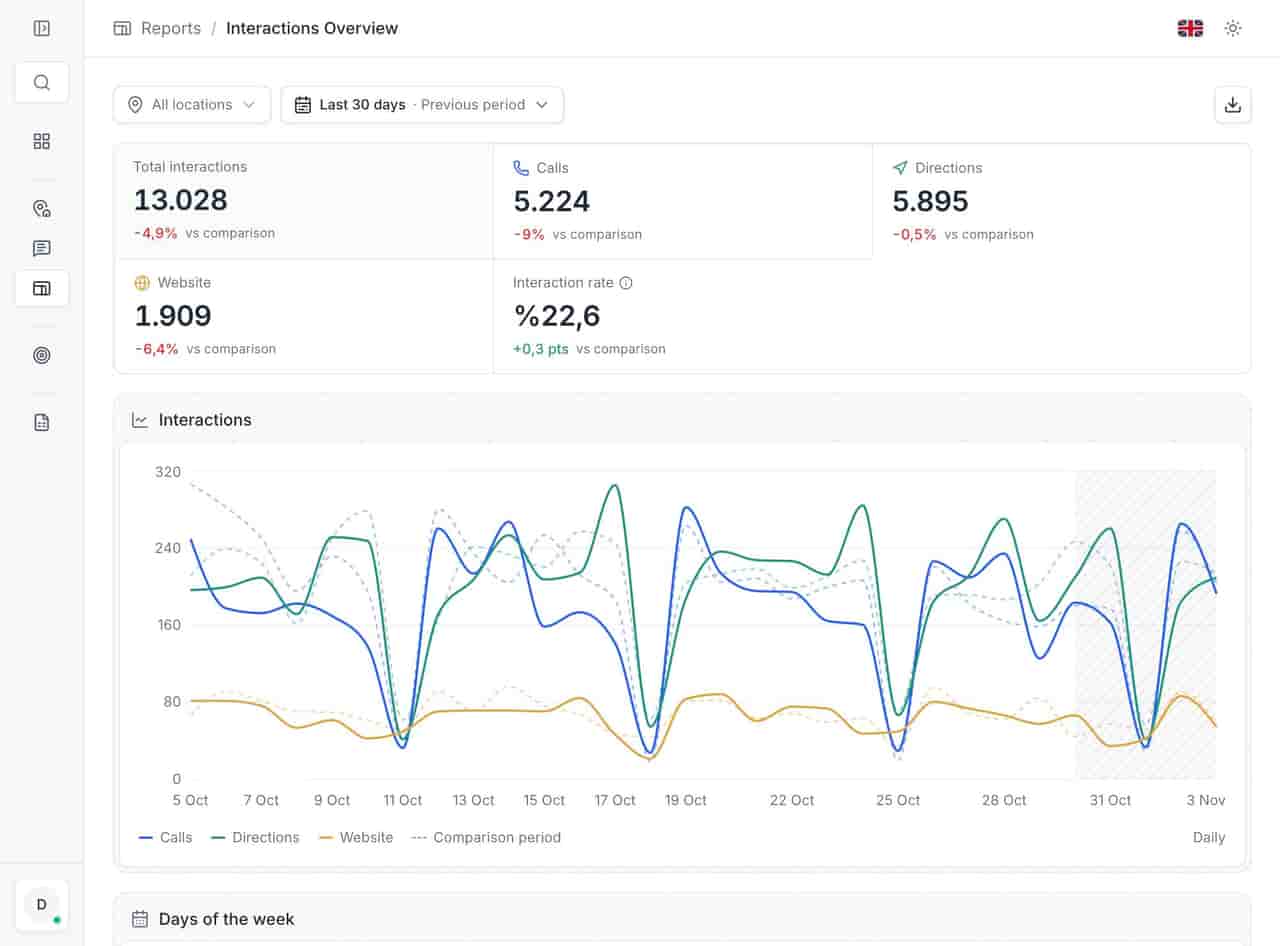
An expired offer stays on the listing for weeks because nobody owns the calendar. A post with no end date is a liability, and a post nobody measures is a guess. Put the end date in the same row as the start date, and read the interactions report after the campaign.
What not to do with multi-location posts
- Do not use posts as a substitute for profile fields. Hours, services and descriptions belong in the fields, not in a temporary update.
- Do not post the same event to locations that cannot attend it. A workshop in one city is not a national event.
- Do not publish a price without the terms. "From" prices without conditions create the reviews nobody wants.
- Do not bulk-publish without checking the calendar. A post scheduled for a closed day is worse than no post.
- Do not judge posts by impressions alone. A post can be seen and ignored; the interaction is the useful signal.
- Do not leave a seasonal post live after the season. It dates the whole profile.
Checklist before a campaign goes live
- Every location in the campaign actually offers what the post promises.
- Start and end dates are set for each location.
- The local layer has one verifiable detail per store.
- The format is available for every category in the campaign.
- One named owner per region has approved the copy.
- Images are current and show the real location or product.
- The post does not repeat a field that should be permanent.
- A review date is in the calendar, one week after the end.
- The interactions report will be read for the campaign period.
A calendar that survives a Monday
Posts are the most visible sign of whether a multi-location operation is actually run centrally or only described that way. A brand that posts the same expired offer in 40 cities is telling customers that nobody is looking. A brand that posts a true, dated, locally verified message is telling them someone is.
Keep the calendar small, give every post an end date, and measure the interaction rather than the impression. The multi-location management view is where the locations, fields and calendar live together; the impressions and interactions report is where the campaign result shows up.
If the posting rhythm keeps slipping, the problem is usually the process before the content. Managing many locations without a spreadsheet covers the weekly queue that makes a calendar sustainable.
Questions, answered.
Do Google Posts improve local ranking?
How often should a multi-location brand post?
What happens when a post expires?
See how the deleted reviews archive keeps the record, including the reply.
FeaturesKeep reading
Related
Related pages
Features, sectors and reading that share the same work.