



Manage 50 Google Business locations without a spreadsheet
An operating model for 50 Google Business locations: store codes, a weekly queue, safe bulk updates and a handover that survives staff changes.
Last updated:
The spreadsheet starts well. One tab per region, a column for the store code, another for the Google rating, a third for "profile complete?". Someone adds conditional formatting and it looks like a system. Six months later it has forty columns, three people own different copies, and nobody can say whether the row for store 1042 reflects Google or reflects what a manager typed in March.
What breaks is not data entry. It is trust. A spreadsheet records what someone believed at a moment; a profile changes when Google applies an edit, when a store closes, when a review disappears. At fifty locations the gap between the sheet and the listings becomes a job nobody was hired to do.
What is multi-location Google Business Profile management?
That definition is deliberately boring: no ranking promise, because the value is not a better map position. It is knowing on a Monday which store is broken and who is fixing it.
Where the spreadsheet breaks
- There is no shared identity. One sheet says "Manchester Arndale", another says "M42", Google has its own listing. The moment a person has to translate between three names, a row can be updated correctly and still point at the wrong store.
- The sheet is a snapshot, not a state. Google applies a user-suggested edit, a location closes, a holiday update lands on 30 stores. The sheet keeps last month's answer until someone remembers to ask.
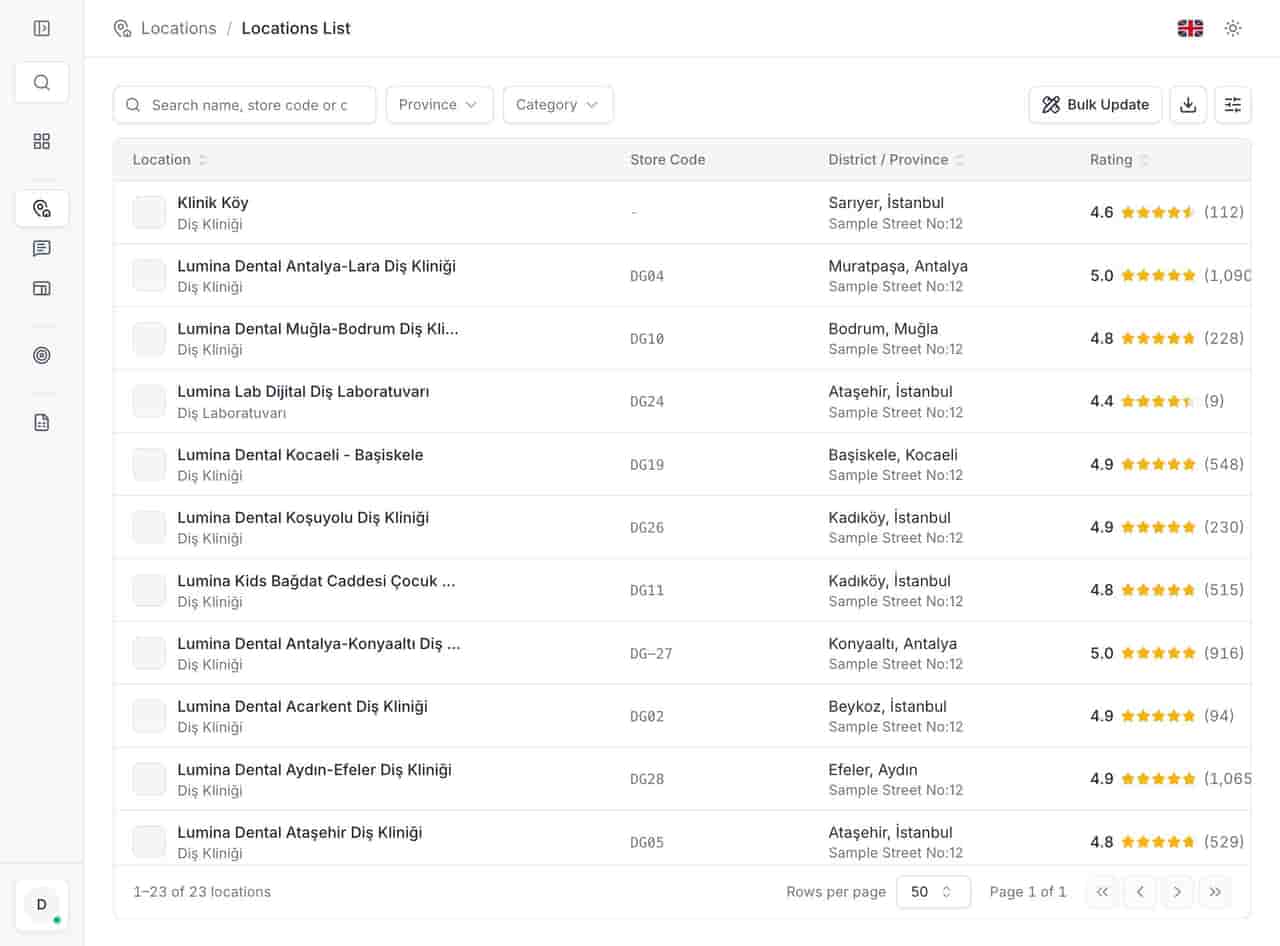
- Reviews do not fit in cells. The anonymized 23-location demo account holds 9,749 reviews. You cannot put a reply, its language, its age and its location into a spreadsheet and still see what needs answering today.
- Access is all or nothing. Share the file and a regional manager sees every region, including the stores they do not run. Restrict it and head office loses the view it needs.
- It leaves with one person. The file lives in someone's Drive, with their naming and their colour rules. When they go, the process goes.
The spreadsheet was not a mistake. It was right for five locations and a reasonable bridge to fifteen. At fifty it is a second, inaccurate copy of Google, and maintaining a copy is not management.
The store code is the only join key
Every multi-site business already has a number that finance, logistics and the point-of-sale system agree on. Use that one. A store code survives a rebrand, an address correction and a change of manager. The Google listing name does not.
Three rules keep it useful:
- One code per trading location. A closed store keeps its code but changes status; the code is never reused for a new site, or history attaches to the wrong place.
- The code appears in every view. Location list, review row, report, export, support ticket. If a team has to search by name, the code is decoration.
- The code is not the Google name. Do not put "1042" into the public business name to make matching easier. The public listing follows Google's naming rules; the code belongs in your internal record and, where available, in Google's own location labels.
Store codes make bulk work safe. "Update these 12" is a list you can check; "update the north region" is a filter that may include a store that moved last week.
A weekly rhythm that survives a bad week
The cadence matters more than the tool. A rhythm that depends on someone finding time fails in the week a store floods or a manager resigns. Use short, fixed blocks with one owner each.
| Cadence | What runs | Owner | Output |
|---|---|---|---|
| Daily, 10 minutes | New negative reviews, permission or closure alerts | Store or duty manager | Replies sent, alert triaged |
| Weekly, 30–45 minutes | The Monday queue: unanswered reviews, flagged profile changes, suspicious 5-star clusters | Regional manager | A cleared list, not a meeting |
| Monthly, 1–2 hours | Rating movement, response time, deleted reviews, profile scores, keyword and impression trend | Head office or marketing | One report, one date range |
| Quarterly | Access review, duplicate scan, seasonal hours plan, template review | Operations lead | Updated permissions and a calendar |
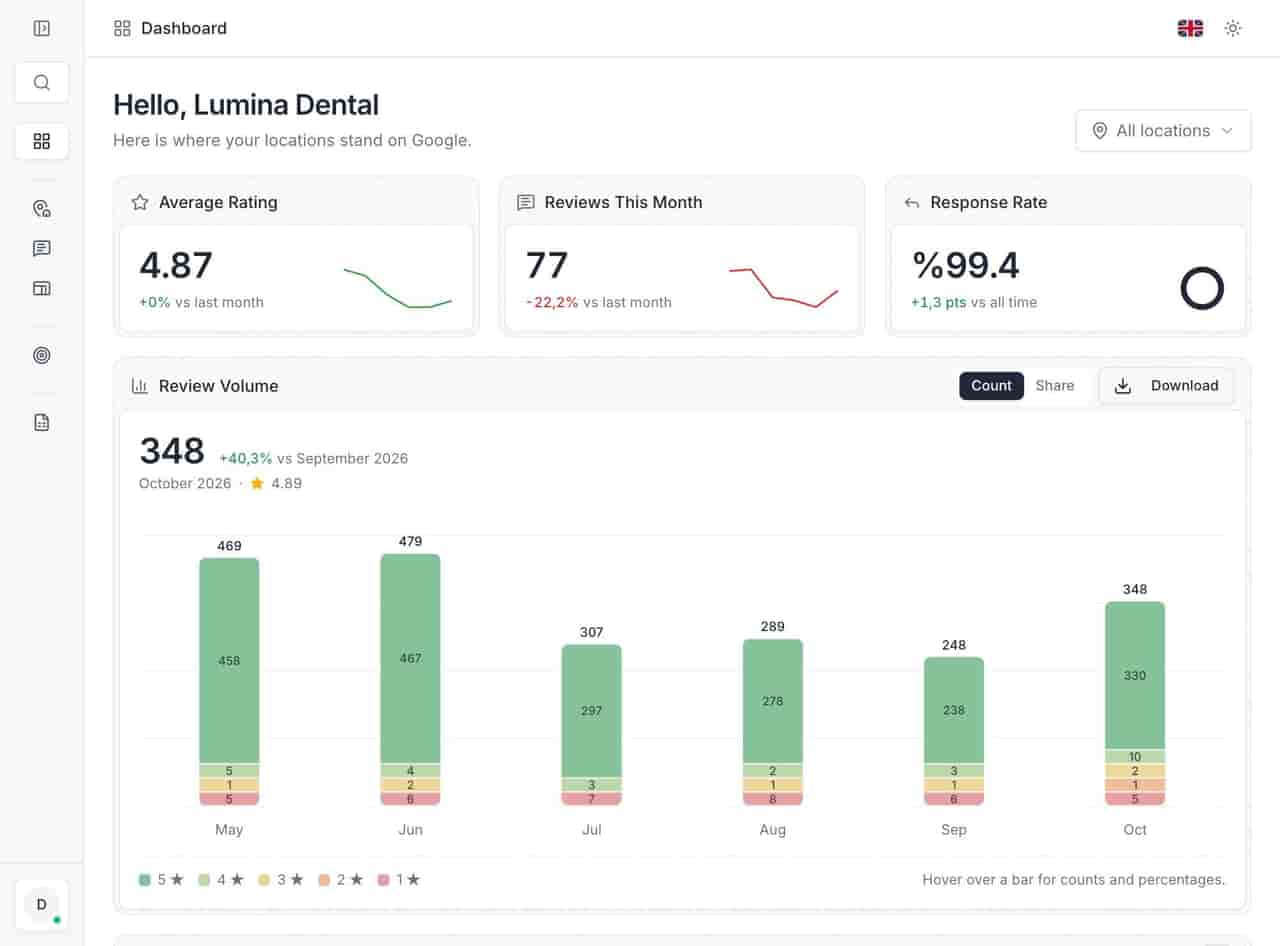
The weekly queue carries the weight. In the product it is the action list: items ranked by risk, each linked to the review or field it came from, so a manager does not start by browsing fifty locations. Unanswered negative reviews come first, then changes Google flagged, then days when a location collected a cluster of 5-star reviews that Google often removes. The order is the opinion; the links are the evidence.
Two details make the rhythm honest. First, the queue is shared: head office and the regional manager look at the same list, filtered differently. Second, it is cleared, not reviewed. A weekly meeting that ends with "we should look at those" has moved nothing.
Bulk updates and the handover problem
When a bulk update is right
Bulk is right when the change is identical, verifiable and reversible. Holiday hours for a group of stores. A new service line that every branch now offers. A corrected website URL. A description edit approved by brand. In each case the same text belongs in many places, and the only question is whether it landed.
Three habits keep it safe:
- Select the locations explicitly by store code, never "all" by default.
- Check the count before publishing, and know which stores are deliberately excluded.
- Re-run the profile audit afterwards. A bulk update that failed on four stores should look like four findings, not a success message.
When a bulk update is dangerous
Identity fields are not bulk fields. Name, primary category and address decide what the listing is; a wrong bulk edit there can trigger a suspension and takes weeks to unwind. The same applies to any change with local exceptions: a store with different Sunday hours, a clinic with a temporary closure. Bulk tools do not know local context; the person selecting the stores does.
What survives a handover
When a regional manager leaves, the informal knowledge leaves with them: which store manager answers reviews, which listing is a known duplicate, why one branch has two categories. A working system keeps the parts that can be written down:
- The store code and its status history.
- Every review and every reply, including the replies to reviews Google later removed.
- Saved templates and who approved them.
- The audit trail: who changed which field, and when.
- Per-user access that can be revoked in one place.
Export the list before the last day, not after. An Excel export is a poor operating system but a good leaving present — and the reason the export queue exists.
A first-month checklist
- Build the location list with store codes, and mark closed or duplicate listings before optimizing anything.
- Pick one owner per field: hours, description, photos, replies, access.
- Set the daily review block and the weekly queue. Put both in calendars with names attached.
- Run one profile audit across the estate and fix the ten checks per location, busiest stores first.
- Move the five most common replies into shared templates, then reply to the current backlog in one pass.
- Agree the monthly report before the first month ends: which metrics, which date range, who reads it.
- Review permissions. Remove anyone who has left, and restrict regional managers to their own stores.
- Test the handover: ask a colleague to find one store's review history and profile status using only the system, not your memory.
If the test takes more than two minutes, the process still lives in a person. That is the spreadsheet problem in a new interface.
The point is not the tool
Fifty locations do not need a prettier spreadsheet. They need one identity per store, one queue that reflects Google's current state, a cadence with owners, and a record that survives staff changes. Get those four right and the tool choice becomes obvious; get them wrong and any tool is another tab nobody trusts.
If you are running a retail estate with seasonal hours, the same pattern shows up in retail: head office changes and local exceptions arrive in the same week. Start by reading what a Google Business Profile actually controls, then try the list with your own store codes.
Questions, answered.
How many locations can one account manage?
What is a store code used for?
Can we update hours for many locations at once?
See how the deleted reviews archive keeps the record, including the reply.
FeaturesKeep reading
Related
Related pages
Features, sectors and reading that share the same work.